> ## Documentation Index
> Fetch the complete documentation index at: https://docs.loisforword.com/llms.txt
> Use this file to discover all available pages before exploring further.
# Playbooks Overview
> How LOIS for Word playbooks codify your team's contract review expertise into rules the AI applies automatically, with fallbacks, precedent, and analytics.
Playbooks capture how your team negotiates: what issues to flag, how to redline them, what fallback positions to offer, and when to escalate. Once configured, LOIS for Word applies these rules consistently across every review.
## Why playbooks matter
Without playbooks, every contract review starts from scratch. With them, you build on accumulated wisdom:
* **Institutional memory** - Years of negotiation expertise encoded and accessible
* **Consistent quality** - Same high standards applied regardless of reviewer or time pressure
* **Faster reviews** - Skip the obvious, focus on what needs attention
* **Continuous improvement** - Every negotiation makes your playbook stronger
Think of playbooks as your team's collective brain for contract review.
## The review workflow
### 1. Run the playbook
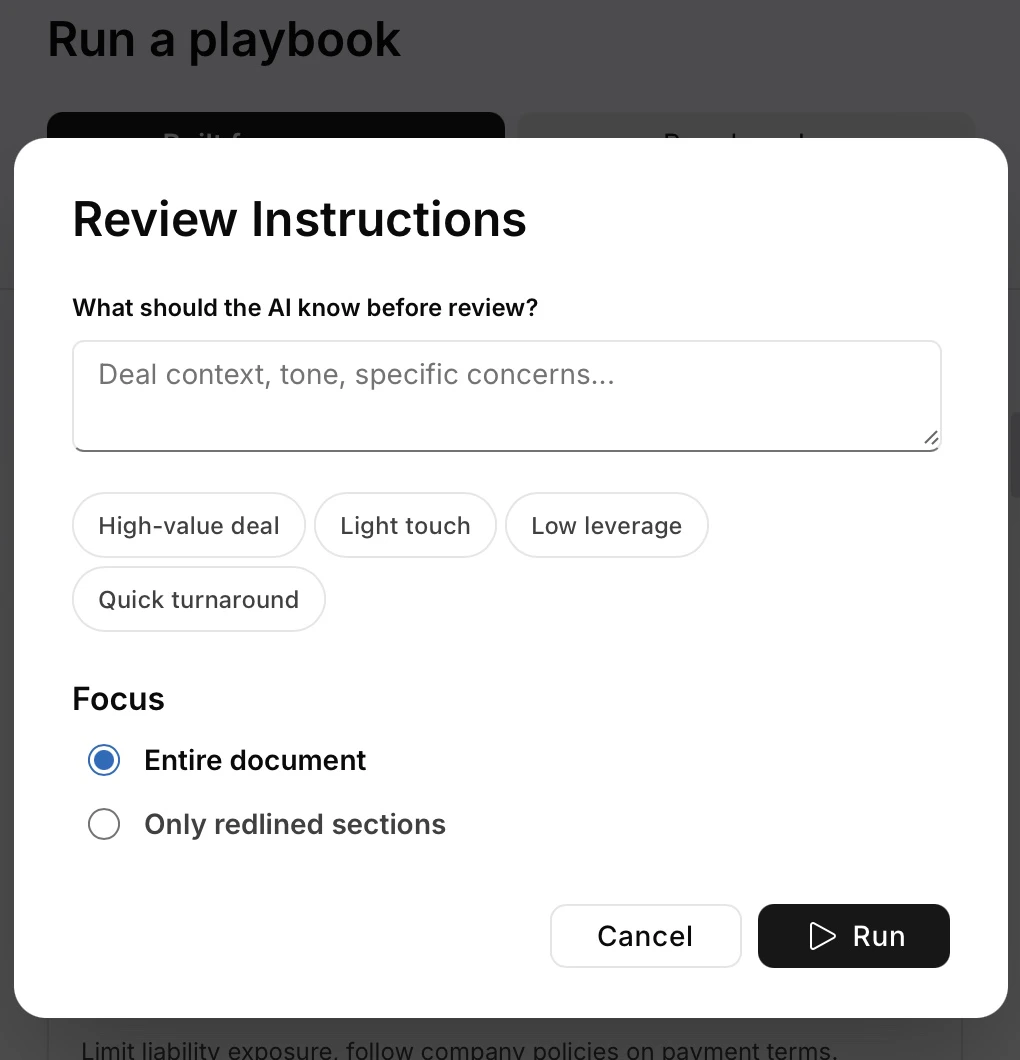
Open a contract and select your playbook.
Before running the playbook, add context that the AI should have before review. You can select quick context options like "high-value deal" that help the AI adjust its review approach. (For example, the review would be more conservative on high-value deals or focus only on critical issues for light-touch reviews.) Then, choose whether to focus the playbook on the entire contract or only on the redlined sections.
 LOIS for Word scans the document and returns:
* Provisions that fail your standards
* Missing required terms
* Unusual language needing attention
* Suggested redlines with fallback positions
This first pass handles the routine issues so you can focus on what needs judgment.
### 2. Refine with Composer
Use Composer to adjust for context:
**Adjust for leverage**
```prompt theme={null}
This is a strategic deal with limited leverage.
Which of these playbook positions can we soften while maintaining core protections?
```
**Consider industry context**
```prompt theme={null}
They're a regulated financial institution.
How should we modify our data protection fallbacks to acknowledge their compliance requirements?
```
**Test alternative approaches**
```prompt theme={null}
They rejected our 12-month liability cap.
Suggest three alternatives that achieve similar protection.
```
### 3. Handle exceptions
Playbooks cover standard situations. Composer handles the edge cases:
**Multi-party dynamics**
```prompt theme={null}
This involves three parties with different risk profiles.
How should we adjust our indemnification approach?
```
**Regulatory overlays**
```prompt theme={null}
New GDPR guidance just came out.
Does our playbook position still work or do we need updates?
```
**Business trade-offs**
```prompt theme={null}
If we accept their payment terms, what should we ask for in return?
Our playbook says 30 days, they want 90.
```
### 4. Capture what you learn
Save successful approaches back to your playbook using saved prompts or precedents.
## Advanced techniques
### Layer multiple playbooks
Apply playbooks in sequence for complex deals:
1. Base commercial terms
2. Industry-specific overlay (healthcare, financial services)
3. Deal-size exceptions
Ask Composer to flag conflicts between playbook positions.
### Compare to market
Test your positions against standards:
```text theme={null}
Compare our playbook to market terms for Series B SaaS companies.
Where are we outside normal ranges?
```
### Mine your precedents
Learn from past negotiations:
```text theme={null}
Show me the last 5 times we deviated from playbook on termination.
What were the business reasons?
```
## Keeping playbooks effective
### Add context with changes
When you save new fallback language, include why:
* When to use it (deal size, counterparty type, leverage situation)
* Why it works (business rationale)
* What you traded for it
### Watch for drift
If you're constantly overriding the same rule, update the playbook. Ad-hoc exceptions shouldn't become the hidden standard.
### Review quarterly
Market conditions change. Regulations change. Your risk tolerance changes. Compare your playbook to recent deals and update positions that no longer reflect reality.
## Measuring impact
Track these to see if your playbook is working:
* **Review speed**: Time from document receipt to first markup
* **Consistency**: How much positions vary across reviewers
* **Acceptance rate**: How often counterparties accept your positions
* **Issue detection**: Problems caught by playbook vs. found manually
* **Knowledge capture**: New fallbacks added monthly
LOIS for Word scans the document and returns:
* Provisions that fail your standards
* Missing required terms
* Unusual language needing attention
* Suggested redlines with fallback positions
This first pass handles the routine issues so you can focus on what needs judgment.
### 2. Refine with Composer
Use Composer to adjust for context:
**Adjust for leverage**
```prompt theme={null}
This is a strategic deal with limited leverage.
Which of these playbook positions can we soften while maintaining core protections?
```
**Consider industry context**
```prompt theme={null}
They're a regulated financial institution.
How should we modify our data protection fallbacks to acknowledge their compliance requirements?
```
**Test alternative approaches**
```prompt theme={null}
They rejected our 12-month liability cap.
Suggest three alternatives that achieve similar protection.
```
### 3. Handle exceptions
Playbooks cover standard situations. Composer handles the edge cases:
**Multi-party dynamics**
```prompt theme={null}
This involves three parties with different risk profiles.
How should we adjust our indemnification approach?
```
**Regulatory overlays**
```prompt theme={null}
New GDPR guidance just came out.
Does our playbook position still work or do we need updates?
```
**Business trade-offs**
```prompt theme={null}
If we accept their payment terms, what should we ask for in return?
Our playbook says 30 days, they want 90.
```
### 4. Capture what you learn
Save successful approaches back to your playbook using saved prompts or precedents.
## Advanced techniques
### Layer multiple playbooks
Apply playbooks in sequence for complex deals:
1. Base commercial terms
2. Industry-specific overlay (healthcare, financial services)
3. Deal-size exceptions
Ask Composer to flag conflicts between playbook positions.
### Compare to market
Test your positions against standards:
```text theme={null}
Compare our playbook to market terms for Series B SaaS companies.
Where are we outside normal ranges?
```
### Mine your precedents
Learn from past negotiations:
```text theme={null}
Show me the last 5 times we deviated from playbook on termination.
What were the business reasons?
```
## Keeping playbooks effective
### Add context with changes
When you save new fallback language, include why:
* When to use it (deal size, counterparty type, leverage situation)
* Why it works (business rationale)
* What you traded for it
### Watch for drift
If you're constantly overriding the same rule, update the playbook. Ad-hoc exceptions shouldn't become the hidden standard.
### Review quarterly
Market conditions change. Regulations change. Your risk tolerance changes. Compare your playbook to recent deals and update positions that no longer reflect reality.
## Measuring impact
Track these to see if your playbook is working:
* **Review speed**: Time from document receipt to first markup
* **Consistency**: How much positions vary across reviewers
* **Acceptance rate**: How often counterparties accept your positions
* **Issue detection**: Problems caught by playbook vs. found manually
* **Knowledge capture**: New fallbacks added monthly